# Introduction to Ribbon Finance
[Ribbon Finance](https://app.ribbon.finance/) is a suite of DeFi protocols that help users access crypto structured products. By combining derivatives, lending and a proprietary [on-chain options exchange (Aevo)](/aevo), Ribbon aims to be the one-stop solution for users who want to improve a portfolio's risk-return profile.
Here you can find the products descriptions and [outgoing links](broken://pages/8PQKnbaYZb0faTaZ2CUn) to the different communication channels, where you can reach out to the Team and Community.
## Theta Vaults (DOVs)
Theta Vaults, also known as DOVs (DeFi Options Vaults), were invented by Ribbon in 2021. At its core, a Theta vault is a yield-oriented strategy that proposes that depositors trade volatility on their underlying by selling [European options](https://www.investopedia.com/terms/e/europeanoption.asp#:~:text=What%20Is%20a%20European%20Option,of%20or%20sell%20the%20shares.) with weekly expiration. The sale value of these options, or "premium," is set through [auctions](/theta-vault/theta-vault#auctions) and determines the vault return. The vault reinvests the premiums earned back into the strategy, effectively compounding them for depositors over time.
There are two types currently active:
1. [Covered call selling](https://www.investopedia.com/terms/c/coveredcall.asp): each week the vault issues [OTM (out of the money)](https://www.investopedia.com/terms/o/outofthemoney.asp#:~:text=Out%20of%20the%20money%20is,above%20the%20put's%20strike%20price.) call options on all deposits.
2. [Put selling](https://www.investopedia.com/terms/p/putoption.asp): each week the vault issues OTM put options on all deposits.
For more information you can check [this section](/theta-vault/theta-vault).
## Ribbon Earn
The [R-Earn vaults](/ribbon-earn/introduction-to-ribbon-earn) employ fully funded strategies to capitalize on the intra-week ETH movements, while also ensuring their capital is protected. The vaults earns a base APY and uses the remaining funding to purchase weekly options.
There are currently two vaults available:
1. Earn USDC: it employs a twin win strategy through which depositors can capitalise on the intra-week ETH movements in either direction;
2. Earn stETH: employs dolphin strategy through which depositors can capitalise on the upside ETH movements.
For more information you can check [this section](/ribbon-earn/introduction-to-ribbon-earn).
## Ribbon Treasury
Ribbon Treasury are private Ribbon Theta vaults built specifically for DAOs to run covered calls on their native tokens. These private vaults are segregated from the main Ribbon vaults, and run a custom strategy for each DAO. Each vault has a few unique parameters:
* **Strike Selection Methodology**\
DAOs can choose how aggressive they want to be with regards to the strike selection methodology.
* **Tenor**\
DAOs can choose how often they want to run the strategy. The current Ribbon Vaults run a weekly strategy that automatically re-rolls, but DAOs can choose longer tenors.
* **Premium Currency**\
DAOs can also choose what currency they want to receive the premiums in. For example, a DAO could elect to receive premiums in USDC or ETH, depending on their treasury diversification goals.
For more information you can check [this section](/ribbon-treasury/introduction-to-ribbon-treasury).
## Ribbon Lend
#### \*\*\*Ribbon Lend is currently paused until further notice\*\*\*
Ribbon Lend can be described as an uncollateralized Aave, allowing depositors to lend unsecured to KYC/AML’d institutional market makers of their choosing with high liquidity. Ribbon Lend offers the best of both worlds between TradFi and DeFi:
* High yields from unsecured lending
* No lockups from Aave’s money market model
* Off-chain enforcement / credit underwriting
* Built-in insurance
For more information you can check [this section](/ribbon-lend/introduction-to-ribbon-lend).
# Aevo
[Aevo](https://www.aevo.xyz/) is a high-performance, order-book based decentralized exchange that comes with all the features necessary for a pro options trader. This includes a robust margining system, as well as hundreds of instruments to trade, including daily/weekly/monthly/quarterly options. All of this is built on a custom EVM rollup that was designed for scale, and rolls up to Ethereum for security.
Aevo aims to become the #1 venue to trade options on-chain.
### *AEVO has launched! Check out* [*www.aevo.xyz*](https://docs.ribbon.finance/www.aevo.xyz)
# FAQ
Please take a look at the subpages. If you can't find your answers, reach out to us on [Discord](https://discord.gg/85gcVafPyN), we'll help you!
# General
### What are structured products?
[Structured products](https://www.investopedia.com/articles/optioninvestor/07/structured_products.asp) are packaged financial instruments that use a combination of derivatives to achieve some specific risk-return objective, such as betting on volatility, enhancing yields or principal protection.
### What is the risk of the covered-call vault?
The primary risk for running a covered-call strategy is that depositors could potentially give up upside in exchange for guaranteed yield. By selling a call option users are essentially promising to sell the asset at the strike price even if the price rises. This may result in a negative yield on the underlying asset. However, in that case depositors will still be up in USD terms, as the underlying asset would have appreciated significantly in a short period of time.
### What is the risk of the put-selling vault?
The primary risk for running a put-selling strategy is that the vault may incur a weekly loss in the case where the put options sold by the vault expire in-the-money (meaning the price of the underlying asset is below the strike price of the put options minted by the vault).
### What is the options infrastructure used by the vaults?
Ribbon options are built on the Opyn V2 protocol, even on Avax.
### Is Ribbon multichain?
We're currently on Ethereum mainnet, Avalanche, and Solana. There are currently no plans to expand to further chains.
### Does Ribbon have a token?
Yes, Ribbon has a governance token, RBN. Please read the RBN announcement blog [post](https://ribbonfinance.medium.com/decentralizing-ribbon-governance-395950da7a6) for more details. The RBN token is [0x6123B0049F904d730dB3C36a31167D9d4121fA6B](https://etherscan.io/address/0x6123b0049f904d730db3c36a31167d9d4121fa6b).
### Where's the Treasury?
[Here's the address](https://etherscan.io/address/0xDAEada3d210D2f45874724BeEa03C7d4BBD41674). The Treasury is managed by a multisig made by the Team with two members of the core community.
### Is Ribbon audited?
We're audited by [OpenZeppelin](), [ChainSafe](https://github.com/ribbon-finance/audit/blob/master/reports/RibbonThetaVault%20V2%20Smart%20Contract%20Review%20And%20Verification.pdf) and [Peckshield](https://github.com/ribbon-finance/audit/blob/master/reports/PeckShield-Audit-Report-Ribbon-v1.0.pdf). Despite that, users are advised to exercise caution and only risk funds they can afford to lose.
### Do you have a bounty program?
Yes, we offer a bounty for up to $250,000. Learn more [here](https://immunefi.com/bounty/ribbon/).
# DOV Deposits
### Where can I find assistance on deposits?
[Right here!](/theta-vault/user-guides/how-to-deposit)
### What is the minimum deposit for vaults?
There are no minimum deposits to participate in our vaults.
### Will I receive vault tokens when I deposit?
Not immediately; you'll have to wait for the following Friday for the vault to use your deposited funds. In the meantime they will remain queued and NOT invested. And even after that, you will NOT receive vault tokens by default. You'll be able to get them in two different ways:
1. manually claim them by calling maxRedeem on Etherscan, and then transfer the tokens to your wallet. Please refer to our guide [here](/theta-vault/user-guides/how-to-transfer-vault-positions).
2. stake your vault position (for the eligible vaults) for RBN rewards. Please refer to our guide [here](/theta-vault/user-guides/how-to-stake-unstake-vault-shares-and-claim-rewards).
### Do I have to confirm and redo my deposits every week?
No, the vaults re-invest your deposits on a rolling basis.
### Are deposits subjected to profit or loss from the previous week
No, if you deposit mid-week, you are not exposed to the vault's performance from the previous week.
### Do you recover deposits accidentally made to an incorrect receiving address?
Although we do not generally offer token recovery services, we review these instances on a case by case basis depending on their significance. We do not guarantee token recovery and advise depositors to double check their transactions.
# DOV Withdrawals
### Where can I find assistance on withdrawals?
[Right here!](/theta-vault/user-guides/how-to-withdraw)
### Are queued withdrawals subject to profit or loss of the week?
Yes, since you are initiating a withdrawal for vault shares, those shares are subject to either the profits or losses of that week, which will adjust the final withdrawable amount.
### Can I cancel a queued withdrawal?
Unfortunately, you can't cancel a queued withdrawal. You'll have to complete it and reinvest the funds at a later time. [Remember that you can also pause your position](/theta-vault/user-guides/how-to-pause-and-resume) instead of withdraw.
### Do planned/queued withdrawals count as two gas transactions?
Yes, this process will count as two gas transactions.
### Can I withdraw stETH from the T-STETH-C vault?
You can ONLY withdraw stETH from the T-STETH-C vault.
# DOV Trading and options
### What is the fee structure?
The vault fee structure consists of a 2% annualized management fee and a 10% performance fee. If the weekly strategy is profitable, the weekly performance fee is charged on the premiums earned and the weekly management fee is charged on the assets managed by the vault. If the weekly strategy is unprofitable, there are no fees charged.
### How is APY calculated?
We calculate APY by getting the average of the past 4 week's annualized performance:
Weekly Yield = ((1+(Curr. Week’s Performance)^52)-1)\*100
Projected Yield (APY) = Average of Past 4 Week's Weekly Yield (in the money weeks are excluded)
### Are the management and performance fees included in the expected APY?
Yes.
### Where can I see the historical performance?
Every product has a card with the vault's graphical representation of historical performance. You may refer [here](https://www.tokenterminal.com/terminal/projects/ribbon-finance) for further insights.
### Are the management and performance fees included in the previous week's performance?
Yes.
### What asset are the vault yields paid in?
Yields are paid in the same underlying deposit asset. The only exception are the staked tokens vaults: stETH, rETH and sAvax. You can deposit either vanilla ETH/Avax or the staked versions but you'll be able to withdraw stETH, rETH and sAvax only.
### Are the vaults cash or physically settled?
Our vaults are [cash settled](https://www.investopedia.com/terms/c/cash-settled-options.asp), which means you do not need physically deliver an asset on expiry. Call options are cash-settled with the collateral asset, whereas put options are cash-settled with USDC.
### Do vaults use a delta neutral strategy?
No.
### How is the strike calculated?
Our V2 vaults use an algorithmic strike selection with a delta of 0.1 for writing options, see our blog post [here](https://ribbonfinance.medium.com/algorithmic-strike-selection-e07ae917c146) and the underlying Black-Scholes model [here](https://github.com/ribbon-finance/rvol/blob/master/contracts/core/OptionsPremiumPricerInStables.sol#L163). The process is currently managed offchain, because it would be very gas intensive and impractical.
### How can I find out the next strike in advance?
There is no way to know the strike in advance as it's calculated using last minute data feeds. For now, you can make an educated guess looking at 10d on Deribit.
### How is the IV calculated/sourced?
The model for IV isn't open but based on IV at 10d and adjusted with historical volatility. We use the 10d IV from Deribit for ETH/BTC and roll our own algo for alts.
### Where can I learn more about the strategies?
Please refer to the vault cards on our website as they have a step-by-step guide to the strategy currently used.
### Can I buy the options written by the vaults?
Yes, if you'd like to participate in our auctions, please join our Telegram [channel]() - and access our new auctions [website](https://auction.ribbon.finance). For more information please refer to the guide [here](/theta-vault/user-guides/how-to-participate-in-paradigm-auctions).
### I've bought some options and they are expiring ITM, do I need to do something to exercise?
There is no further action needed on your end as we are using Opyn V2, options self exercise when needed. You just need to claim them at any time.
### How can I redeem my assets if the options expire in the money?
Please refer to the Opyn V2 interface [here](https://gammaportal.xyz/#/account/). Also, here's a [practical guide](/theta-vault/user-guides/how-to-redeem-otokens).
### **Is there a deadline for exercising oTokens?**
The profits from exercising the options are locked in on expiry. There is no deadline for exercising oTokens.
### **The options expired in-the-money. Why can't I claim the collateral?**
After the options expire at 8am UTC, there is about 1 hour dispute period for settlement. You can only claim the collateral with oTokens after 9/10 am UTC.
### I've called the max redeem but I didn't get any token. Why?
If you called max redeem the same week you deposited, you wouldn't receive any tokens as your funds weren't used by the vaults.
### Are vault tokens are 1:1 with the underlying?
No, rETH-THETA is constantly changing as premiums are collected each week. So rETH-THETA is not 1:1 to ETH.
### I just deposited in a vault, why can't I stake any rTokens?
You'll have to wait until the next Friday to stake your rTokens because your funds aren't actively used right now.
# Ribbonomics
### Can I stake my RBN?
YES but NO, it's not staking, it's locking so be sure to understand the differences taking a look at [this guide](/ribbonomics/how-to-lock-rbn-boost-and-claim-protocol-revenues). Locking your RBN will also give you a percentage of protocol revenues, paid weekly in ETH. You can proceed to lock your RBN on the Governance portal:
### Where can I see any details on veRBN in circulation, holders, average lock duration?
Here's a Dune dashboard made by our fellow Ribbonato Lewi:
### Where can I learn more about the Ribbonomics?
Please refer to our documents [here](/ribbonomics/overview-and-rbn-tokenomics).
### I've staked the vault tokens, when can I claim my RBN rewards?
Although you can claim whenever you like, please note that you'll accumulate at every block but rewards are restocked weekly. For more information, take a look [here](/theta-vault/user-guides/how-to-stake-unstake-vault-shares-and-claim-rewards).
### Do I need to stake the vault tokens every week?
No, you just need to stake them once.
### When staking vault tokens, do I still receive the APY from the vaults or the pool rewards only?
You receive both APY from the vaults and pool rewards.
### Do I have to lock my RBN for 2 years?
No, 2 years is the maximum lock up duration. For more info, take a look [here](/ribbonomics/how-to-lock-rbn-boost-and-claim-protocol-revenues).
### Can I lock some of my RBN for different durations?
In order to lock your RBN for various durations you'll have to split them between wallets. Be mindful of your vault position(s), as you will likely lose the boost. Please, check our [guide](/ribbonomics/how-to-lock-rbn-boost-and-claim-protocol-revenues).
### How often does my boost records voting power changes?
Your voting weight decreases over time but your boost will take notice of your decreasing voting power at certain checkpoints like withdrawing or staking. For example if you start at 1000 veRBN and your voting power decreases to 800 veRBN, your boost will still use your original voting power of 1000 veRBN until a user checkpoint.
### How can I apply my boost?
After creating or adding to your lock, you need to click the "Apply Boost" button on each gauge you're providing liquidity in to apply the boost. Your boost can also be updated by depositing and withdrawing from a gauge as well as claiming RBN.
### If I boost locking RBN but I have more than one vault position, which one takes the boost?
All of your vault positions will get boosted. Please, check our [guide](/ribbonomics/how-to-lock-rbn-boost-and-claim-protocol-revenues).
### If I lock RBN for X time and then decide to extend the lock up, will I be able to do so?
Yes, you can extend the lock up period. Please, check our [guide](/ribbonomics/how-to-lock-rbn-boost-and-claim-protocol-revenues).
# Dune dashboards
### - [Whole protocol](https://dune.com/ribbon/vaults)
### - [Locked RBN](https://dune.com/lewi/VeRBN-Ribbon-Finance)
# Contribute
## How to Contribute
### Governance
The Ribbon Community uses [RBN tokens](/ribbonomics/overview-and-rbn-tokenomics) to govern the protocol by voting on Ribbon Governance Proposals (RGPs). Anyone can propose a change to the system by starting a discussion in the forum or Discord, however it requires a minimum of 62,500 RBN to create a Snapshot vote. Visit the forum and resources below to learn more.
* [Governance Forum](https://gov.ribbon.finance/)
* [Snapshot Page](https://snapshot.org/#/rbn.eth)
### Have an Idea?
As a community of "yield hackers", we are always open to new experiments and better ways of doing things. If you have an idea, feel free to use the different channels like [Discord](https://tiny.cc/ribbon-discord) or [GitHub](https://github.com/ribbon-finance).
### File an issue
If the product isn't working as intended, please visit the appropriate Github repository to see if the issue already exists.
If it does not exist, please create a new issue in the repository. Please include information such as your browser version, device, etc. for that project so the developers can replicate it and fix it. If the issue already exists, you can signal your support by adding a thumbs up to the existing issue or by adding helpful information.
# Security
## Bug Bounty
We have an ongoing [bug bounty on ImmuneFi](https://immunefi.com/bounty/ribbon/), with up to $250,000 of bounty. The contracts that are included in the bounty are ETH and WBTC Theta Vaults.
## Audits
Ribbon's contracts are audited. Despite the audits and security measures we have taken, we advice users to exercise caution and to not risk funds they are not willing to lose.
Ribbon Earn:
* Veridise
Theta Vault v2:
* [OpenZeppelin](https://blog.openzeppelin.com/ribbon-finance-audit/)
* [ChainSafe](https://github.com/ribbon-finance/audit/blob/master/reports/RibbonThetaVault%20V2%20Smart%20Contract%20Review%20And%20Verification.pdf)
Theta Vault v1:
* [Peckshield](https://github.com/ribbon-finance/audit/blob/master/reports/PeckShield-Audit-Report-Ribbon-v1.0.pdf)
* [ChainSafe](https://github.com/ChainSafe/audits/blob/main/Ribbon%20Finance/Ribbon-Audit_April-2021.pdf)
* [Quantstamp](https://github.com/ribbon-finance/audit/blob/master/reports/Quantstamp%20Theta%20Vault.pdf)
# Introduction to Theta Vaults
## What are Theta Vaults?
Theta Vaults run an automated European options selling strategy, which earns yield on a weekly basis through writing out of the money options and collecting the premiums. We use the Vault terminology because it stems from the idea of depositing your assets into a vault and earning a yield on them.
Users can simply deposit and the vaults will automatically start running a specific option strategy. This alleviates a majority of the gas problems by socializing the gas costs across all the vault depositors: instead of doing 3–4 transactions per week per user, the vault will do 3–4 transactions per week for thousands of users at once. This makes the user experience of using these Theta Vaults extremely straightforward and relatively cheap.
Theta Vaults also allow you to choose when to participate or not to participate in the weekly strategy through a [pause and resume](/theta-vault/user-guides/how-to-pause-and-resume) function, so that you do not limit your usage options in relation to your market expectations.
There are two vault types currently active:
1. [Covered call selling](https://www.investopedia.com/terms/c/coveredcall.asp): each week the vault issues [OTM (out of the money)](https://www.investopedia.com/terms/o/outofthemoney.asp#:~:text=Out%20of%20the%20money%20is,above%20the%20put's%20strike%20price.) call options on all deposits.
2. [Put selling](https://www.investopedia.com/terms/p/putoption.asp): each week the vault issues OTM put options on all deposits.
# Strike Selection and Expiry
Strikes are selected by an [algorithm](https://github.com/ribbon-finance/rvol) at the last minute before the corresponding option auction. The pricing parameter is fixed and is 10 [delta](https://www.investopedia.com/terms/d/delta.asp), so there is no direct relationship between the spot price of collateral and the strike; the key element is volatility.
The strike calculation algorithm is based on the [Black\&Scholes model](https://www.investopedia.com/terms/b/blackscholes.asp), with appropriate adjustments. [Historical volatility](https://www.investopedia.com/terms/h/historicalvolatility.asp) is derived from Uniswap while [implied volatility](https://www.investopedia.com/terms/i/iv.asp#:~:text=The%20term%20implied%20volatility%20refers,it%20to%20price%20options%20contracts.) is determined by a proprietary closed source algorithm; it uses the 10 delta IV from Deribit for ETH/BTC while for alts there's a custom algorithm to set it. The whole model, although developed for onchain use, is executed offchain both because it is gas intensive and because it is of impractical use due to potential rounding errors and the auctions timeframe.
To further reduce the risk of the options getting exercised, Theta vaults sell *weekly* call options, meaning we can adjust our expectation of ETH’s price on a weekly basis. This also has the positive side effect of letting us compound our premiums more frequently.
##
# Options Architecture
Theta Vaults in its present design relies on [Opyn](https://opyn.co/) oTokens. oTokens are ERC20 token representations of an options contract, where each of them have a strike price and expiry. Owning oTokens is functionally equivalent to owning an options contract. This gives the oToken holder the right to redeem some amount of the underlying asset if the strike price is hit.
In order to run an options-writing strategy, the Vault needs to be able to mint and short oTokens. The Vault uses the users’ deposited funds to lock collateral into Opyn + mint oTokens, then sells them for a premium. The Vault’s collateral will be locked until the expiry of the oToken. This collateral is used to pay off oToken holders in the case that the options expire in the money.
Opyn options are [cash settled](https://www.investopedia.com/terms/c/cash-settled-options.asp#:~:text=A%20cash%2Dsettled%20option%20is,commodities%2C%20or%20any%20other%20asset.), so if the options expire ITM, there is no transfer of the underlying: the difference between the strike and the market price at expiry will be compensated by liquidating part of the deposits.
Also, Opyn options self exercise at expiry if ITM. In these docs you'll find more details about [settlement](/theta-vault/theta-vault/options-settlement) and [redeeming](/theta-vault/user-guides/how-to-redeem-otokens).
# Options Settlement
## Settlement price
Currently, we are relying on Opyn's infrastructure for option settlement. Opyn uses Chainlink's spot prices as a data source to settle options.
After a few improvements and learnings, we have decided to use [Pyth's](https://pyth.network/) oracle for settlement price when options expire in-the-money. The reasons as follows:
* Chainlink's data source is not designed to be used for expiries because it uses data sources such as aggregators (CoinGecko or CoinMarketCap) which are often delayed.
* Pyth provides a more accurate view of the price data due to how it fetches real-time price data from exchanges.
## wstETH and rETH options
Ribbon's vaults writes options that are collateralized with liquid staking derivative tokens such as wstETH (Wrapped Staked ETH) and rETH (Rocket Pool ETH).
There are some core differences for how settlement price is calculated for these options. How the settlement price is calculated is as below:
1. We figure out how much stETH each wstETH can be unwrapped for.
2. We treat 1 stETH as 1 ETH from a price perspective.
3. We set the expiry price to the price of ETH.
#### Example
We have an ETH $2000 call option. For this example, we will be collateralizing the call option with wstETH and we assume that 1 wstETH = 1 stETH. If ETH ends up in-the-money at $2500, an option holder would be able to claim $500 worth of ETH for a normal ETH call option, or 0.2 ETH.
In the case of wstETH, 0.2 wstETH can be claimed at expiry. However, 0.2 wstETH can only be traded for 0.19 ETH on liquidity pools like Curve, which means the option holder would have 5% less profits if they swapped back to ETH after claiming.
The implications for this are:
* wstETH options have the same payoff calculation as a regular ETH option, except the collateral received is wstETH, which is unwrapped for stETH.
* This means if stETH is trading 5% below the value of ETH, the amount returned from exercising the option is 5% less.
# Auctions
After an initial period of public auctions on Gnosis, we have partnered with [Paradigm](https://www.paradigm.co/) to bring the auctions to their platform and achieve more favorable execution for vault depositors. If you want to participate, take a look at [this section](/theta-vault/user-guides/how-to-participate-in-paradigm-auctions).
Among the main reasons for the change is a structural limitation of Gnosis: it clears at the *lowest* possible price where demand meets supply. This means that if A is willing to buy half the supply for $10, and B is willing to buy the other half at $9, the entire auction will clear at $9.
Using the Paradigm system, we are able to run [blind auctions](https://en.wikipedia.org/wiki/First-price_sealed-bid_auction), in all-or-nothing format. This helps to create more price competition between bidders and reduce gaming of the on-chain auction system, ultimately leading to better pricing.
For an in-depth analysis of the auctions, you can check this [Ribbon Research post](https://www.research.ribbon.finance/blog/ribbon-auction-performance-analysis).
As a fee structure, 4bps of the notional volume done by Ribbon go to Paradigm.
##
# Risk profile
The primary risk for running the covered call strategy and put selling is that the vault may incur a weekly loss in the case where the call options sold by the vault expire in-the-money (meaning the price of collateral is above -calls- or below -puts- the strike price of the call options minted by the vault).
# Fees
The vault fee structure consists of a 2% annualised management fee and a 10% performance fee.
If the weekly strategy is profitable, the weekly performance fee is charged on the premiums earned and the weekly management fee is charged on the assets managed by the vault. Please notice that the profitability is evaluated regardless of the expiry of the weekly options. In the unlikely event that the options expire ITM but the vault still makes a profit (i.e., if the weekly premium is able to absorb the loss), commissions will still be charged.
If the weekly strategy is unprofitable, there are no fees charged.
# Theta vaults architecture
## Vault flow example
1. User deposits 100 ETH into T-ETH-C (ETH call).
2. On Friday 8 am UTC, the vault closes the previous week round and subsequently uses 100% of its funds to mint 100 [otokens](https://opyn.gitbook.io/opyn/contracts/otoken), which are ERC20 representations of options contracts. The 100 ETH is locked for a week in Opyn.
3. After receiving the 100 otokens, the vault puts it up for auction on [Paradigm](/theta-vault/user-guides/how-to-participate-in-paradigm-auctions).
* Registered users can participate and bid on the otokens. They pay the premiums for the otoken in ETH. Paradigm can use different kinds of auctions to maximise depositors' returns (e.g. [blind auctions](https://en.wikipedia.org/wiki/First-price_sealed-bid_auction))
* At the end of the auction, the vault collects 1 ETH in premiums in the form of ETH.
* Any remaining otokens that are not bought are burned, redeeming 1 otoken for 1 unit of collateral from Opyn.
4. On the next Friday 8 am UTC,
* If the options expire in the money, the vault withdraws less than 100 ETH from Opyn.
* If the options expire out the money, the vault withdraws exactly 100 ETH.
5. Let's say it expires out the money. The vault repeats step 2 with 101 ETH (original 100 ETH + 1 ETH premium).
### Codebase
| Name | Description |
| -------------------------------------------------------------------------------------------------------------------------------------------------- | ------------------------------------------------------------------------------------------------------------------ |
| [libraries/Vault.sol](https://github.com/ribbon-finance/ribbon-v2/blob/master/contracts/libraries/Vault.sol) | Contains all data structures shared across all vault types |
| [libraries/VaultLifecycle.sol](https://github.com/ribbon-finance/ribbon-v2/blob/master/contracts/libraries/VaultLifecycle.sol) | Contains all logic related to how the Vault functions on a weekly basis |
| [vaults/BaseVaults/base/RibbonVault.sol](https://github.com/ribbon-finance/ribbon-v2/blob/master/contracts/vaults/BaseVaults/base/RibbonVault.sol) | Contains all common logic like accounting and options rolling shared across RibbonThetaVault and RibbonDeltaVault. |
| [vaults/BaseVaults/RibbonThetaVault.sol](https://github.com/ribbon-finance/ribbon-v2/blob/master/contracts/vaults/BaseVaults/RibbonThetaVault.sol) | Theta Vault contract that creates short options position with Opyn on a weekly basis |
## Deposit Flow
IMPORTANT: this is a *technical* explanation, if you need assistance on making a deposit please refer to [this page](/theta-vault/user-guides/how-to-deposit)!
1. The user deposits 1 ETH into TV.
2. We first check if they have an existing `DepositReceipt` from the past `round`. Using the `round` and `amount`, we update the `unredeemedShares` field. This essentially tracks how many shares the user owns, but has not yet redeemed.
```
struct DepositReceipt {
round
amount
unredeemedShares
}
```
1. We create the DepositReceipt with the new details.
2. At `rollToNextOption`, the vault will mint all the shares that are owed to users to `address(this)`. This increments the `vaultState.round`.
3. Since the round is concluded, the user's vault shares should show up by calling `RibbonVault.shares(account)`
The end result:
* Their shares show up automatically once the round concludes.
* `DepositReceipt`s are used to track all the user's unredeemed shares. This is used for withdrawals and redemptions in the future.
## Withdrawal Flow
IMPORTANT: this is a *technical* explanation, if you need assistance on making a withdrawal please refer to [this page](/theta-vault/user-guides/how-to-withdraw)!
The withdrawal flow is slightly more involved. We have two types of withdrawals - Standard and Instant withdrawals.
### **Standard withdrawals**
* Withdrawals are created with the `initiateWithdraw` function, which queues the shares to be burned.
* Withdrawals are completed with `completeWithdraw` function, which burns the shares, and returns the assets.
* Users can only call `completeWithdraw` only AFTER the week's Friday 10am UTC. For example, the user calls `initiateWithdraw` on Wednesday. They can only complete the withdrawal after the same week's Friday 10am UTC.
* Withdrawals stack on top of each other. This means that if I do `initiateWithdraw(10)`, and I do `initiateWithdraw(20)` again, I will have a total withdrawal of 30 shares by Friday.
### **Instant withdrawals**
* Instant withdrawals are only accessible to funds that are deposited mid-week.
* For example, user deposits 10 ETH into TV on Wednesday. They can call `withdrawInstantly` to return up to 10 ETH, from Wednesday till Friday.
## Share Redemption Flow
IMPORTANT: this is a *technical* explanation, if you need assistance on redeeming your vault shares please refer to [this page](/theta-vault/user-guides/how-to-transfer-vault-positions)!
As mentioned before, when the user deposits into the vault, the vault mints and holds custody of the user's shares on `address(this)`. This is not ideal for protocols or Meta-Vaults that want to hold custody of their shares. By calling the `redeem` or `maxRedeem` function, contracts are able to take custody of their vault shares.
The share redemption flow is also triggered implicitly when users call `initiateWithdraw`.
## Access Control
| Name | Privileges |
| ----- | --------------------------------------------------------------------------------------------------------------------------------------------------------------------------------------------------------------------------------------------------- |
| Owner |
The owner can set key parameters of the vault such as feeRecipient, performanceFee, managementFee, deposit cap etc.
Some functions in the vault's lifecycle is only limited to the owner, such as commitAndClose and rollToNextOption.
|
| Admin | The admin can upgrade the proxy's implementation address. |
Both of these privileged roles use a Gnosis Safe multisig wallet.
# User guides
# How to deposit
In this guide you will find instructions for making a vault deposit. If while following these instructions you encounter any difficulties or errors, we are at your disposal in our [Discord](https://www.google.com/url?q=https://discord.gg/rm7h9ce3ep\&sa=D\&source=editors\&ust=1662912471945831\&usg=AOvVaw00JXnO_q07bRaXfgkQLl2m) server Support channel.
Before proceeding, make sure you have read and understand the risks involved in investing in the vaults. You can find the relevant information in each vault card on the webapp. If you need more information, the community is ready to help you.
In order for your deposit to be used by the vault starting the following week, be sure to invest before 8 am UTC on Friday. If you deposit after that time, your funds will remain unused until the following Friday.
## Connect your wallet
After entering the webapp from desktop or mobile, you will need to connect your wallet. Select the appropriate button at the top right (desktop) or bottom (mobile) to proceed.

A selection menu will open: the first step is to choose the network; the second is to select one of the compatible wallets.

Once your wallet is connected, the app will show in the top right (desktop) or bottom (mobile) corner your address in use. It will also automatically filter only those vaults that are compatible with the network you selected. Under each vault card it will show the total of your previous investments.

## Invest
Select the vault into which you intend to deposit by clicking on its card. In the desktop version, you will immediately have the form to make the deposit, on the right side. In the mobile version you will have to select "INVEST" at the bottom of the screen.

If this is the first time you are depositing a particular asset on Ribbon, the deposit form will contain a request for permission to use your tokens. You need to make this transaction only at the first deposit for each asset. In case you later revoke the authorization, you will have to approve the use of tokens again at the next deposit.

Some vaults accept two assets equally:
* STETH-THETA: you can deposit both ETH and stETH; if you deposit ETH, the vault will convert them to stETH at market values on Curve;
* RETH-THETA: you can deposit both ETH and rETH;
* SAVAX-THETA: you can deposit both Avax and sAvax.
A very important note about these three vaults: the moment you deposit ETH and AVAX, they will be immediately converted to stETH, rETH or sAVAX. Therefore, it will no longer be possible to withdraw ETH and AVAX again but only staked tokens.
Once you have entered your deposit amount, the interface will show you a preview of the transaction. If the data is correct, all you have to do is confirm by selecting "DEPOSIT NOW" to activate the authorization prompt in your wallet.

Once the onchain transaction is confirmed, the app will show you a notification in the top right (desktop) or top center (mobile). A reminder of your total investment will also appear in the bottom left (desktop) or bottom center (mobile).

Selecting the reminder will open a summary of your vault position, with the option of seeing your deposited or staked funds.
Please remember that staking what you have just deposited is not possible: you will have to wait until the following Friday, when your funds will be actively used by the vault.

Finally, it should be noted that the vault does not automatically issue any receipt tokens. Therefore, if you need to transfer your position to another wallet, you will need to follow the instructions [here](https://app.gitbook.com/o/-MVFqZpOAlPK2YlaTpjh/s/-MVFqgfeL1BL15YGTBdD/~/changes/2RuXzRZnXGk0Ws6LkUB4/user-guides/transferring-v2-vault-positions).
Your receipt tokens will be automatically claimed in case you are staking your vault shares (only for vaults on ETH mainnet); you can find the instructions [here](/theta-vault/user-guides/how-to-stake-unstake-vault-shares-and-claim-rewards).
Your funds are now deposited in the vault: welcome to Ribbon!
## (optional) Check your deposit on Etherscan
If you want to check the status of your deposit in a vault, you can proceed via Etherscan/Snowtrace. These steps are not possible for vaults on Solana.
Go to the Etherscan/Snowtrace page of the vault in which you deposited (you will find the links in the vault cards) and select the "contract" tab; then select "read as proxy."

Select the function "depositReceipts" and paste your address. The amount the smart contract will show you corresponds to your deposit. Please pay attention to the decimals.

Keep in mind that vaults for USDC have a different number of decimal places: in the example below you can see a deposit of 150 USDC.

# How to withdraw
In this guide you will find instructions for making a vault withdrawal. If while following these instructions you encounter any difficulties or errors, we are at your disposal in our [Discord](https://www.google.com/url?q=https://discord.gg/rm7h9ce3ep\&sa=D\&source=editors\&ust=1662915623979136\&usg=AOvVaw1Swts_wZ6Q7MHXJdVeTOWI) server Support channel.
Please keep in mind that in order to withdraw, your funds in the vault must NOT BE:
* Paused: if you need instructions to resume your position, you can follow [this guide](/theta-vault/user-guides/how-to-pause-and-resume);
* Staked: if you need instructions to unstake your position, you can follow [this guide](/theta-vault/user-guides/how-to-stake-unstake-vault-shares-and-claim-rewards).
There are two types of withdrawals, every detail of which you will find in this guide:
1. Instant: only applicable to funds that are deposited mid-week and have yet to be actively used in the vault or recently resumed positions;
2. Standard: a two-step process. At any point in time you can submit a withdrawal (or many) to the queue and then finalize it after the weekly rollover. A standard withdrawal is also the only form of withdrawal you can use for paused or deprecated vaults; in these cases, please reach out on Discord because action on our part is required.
An important note: It is not possible to make a vault switch; to move between vaults, you must first withdraw and then deposit again. This implies a minimum one-week pause between withdrawal and subsequent entry.
## Connect your wallet
Please refer to the first section of [this guide](/theta-vault/user-guides/how-to-deposit#connect-your-wallet) if you need help connecting your wallet.
## Instant withdrawal
An instant withdrawal is only possible if the funds you deposited have not yet been used by the vault: all funds deposited from 11am UTC on Friday until 8am UTC the following Friday can be withdrawn in this way.
It’s also the method for withdrawing funds that have just been resumed after being paused, again by Friday (for reference, please see [here](/theta-vault/user-guides/how-to-pause-and-resume)).
Select the vault in which you have invested; the withdrawal interface is immediately available in the vault card (desktop) or appears after selecting "INVEST" (mobile). If you do not yet own vault shares, the standard withdrawal will be automatically grayed out.

Select the amount you would like to withdraw and confirm the transaction in your wallet.

Once the onchain transaction has been confirmed, you’ll receive a notification in the upper right corner (desktop) or top section (mobile).

Please remember that vaults containing staked tokens will only return you staked tokens. So even in the case of instant withdrawal, stETH, rETH and sAVAX vaults will give you stETH, rETH and sAVAX.
## Standard withdrawal
The first step for a standard withdrawal is to initiate it. With this action, you will signal the vault to set aside your funds at the next rollover, on Friday after 8 am UTC. This implies that your funds will in any case be subject to the profits or losses of the week in which you decide to initiate a withdrawal.
Before proceeding, remember that you can’t cancel a queued withdrawal, so if you initialize it you’ll have to complete it.
Select the vault in which you have invested; the withdrawal interface is immediately available in the vault card (desktop) or appears after selecting "INVEST" (mobile). If all your funds are already used by the vault, “STANDARD” will be highlighted.

Choose the amount to withdraw and confirm the transaction in your wallet.

As usual, a notification will appear in the topmost part of the screen: your withdrawal is now queued.
The following Friday, the vault at 8 am UTC will close the current epoch and proceed with operations to issue a new set of weekly options. After about 11 am UTC (the time is variable because it depends on the dispute time of expired options and new auctions), you can complete your withdrawal.
There is no rush, though: you can complete your withdrawal at any time; there is no deadline.
Also, an important note: the SOL vault is an exception, you only need to start the withdrawal, you won't need to finalize it by following the next steps. After about 11 am UTC, you will automatically receive your SOL in your wallet, in the form of wSOL (wrapped SOL). For all other vaults, proceed as follows.
Entering the webapp you’ll immediately see a reminder.

As you select the relevant vault card, you will notice that the interface is automatically changed and prompts you to complete your withdrawal.

Continue by confirming the transaction in your wallet. In case a withdrawal valued at zero is indicated, worry not and confirm anyway.
You will receive a confirmation notification at the top of the screen as your funds become available again in your wallet.

Once again, please remember that vaults containing staked tokens will only return you staked tokens. So stETH, rETH and sAVAX vaults will give you stETH, rETH and sAVAX, there’s no way to withdraw ETH or AVAX from them.
## (optional) Instant withdrawal on Etherscan
You can also proceed to withdraw via Etherscan/Snowtrace. These steps are not possible for vaults on Solana.
Go to the Etherscan/Snowtrace page of the vault in which you deposited (you will find the links in the vault cards) and proceed to check your deposit receipt, following the instructions [here](https://docs.ribbon.finance/theta-vault/user-guides/pages/zgTCbb5TILaBo3oeHN9c#h.ejzcwg4bex7m).
After taking note of your receipt, select the "contract" tab, then "write as proxy" and connect your wallet.

Select the function "withdrawInstantly" and write the amount you got as a deposit receipt. Finally, press write and confirm the transaction in your wallet.

## (optional) Standard withdrawal on Etherscan
You can also proceed to withdraw via Etherscan/Snowtrace. These steps are not possible for vaults on Solana.
Go to the Etherscan/Snowtrace page of the vault in which you deposited (you will find the links in the vault cards) and proceed to check your vault shares: scroll down and select the "contract" tab, then "read as proxy"; select the function “shareBalances'' and paste your wallet. Copy the amount shown.

Now select “Write as proxy” and connect your wallet.

Call the function “initiateWithdraw” by writing the amount of your shares and selecting “Write”. You have initiated your withdrawal.

After about 11 am UTC on the following Friday, from the same Etherscan page select “Write as proxy” again and call the function “completeWithdraw”.

# How to pause and resume
In this guide you will find instructions for pausing and resuming your vault positions. If while following these instructions you encounter any difficulties or errors, we are at your disposal in our [Discord](https://www.google.com/url?q=https://discord.gg/rm7h9ce3ep\&sa=D\&source=editors\&ust=1662913972973504\&usg=AOvVaw1wksdZ9YIQLZTjXYbta2UF) server Support channel.
Putting positions on pause will signal the vault not to use your funds actively starting the following week. This is something you must keep in mind: during the week you pause you will still be subject to the week's profits or losses. So it is important to determine whether or not to pause a week in advance.
Once you pause your funds, you will not be able to resume them until the following week; so the resume button won’t appear until then.
The pause will never be stopped automatically; you will necessarily have to take action to get your funds active again.
It is not possible to pause staked vault shares, you'll have to unstake first. If you need help, you can refer to [this guide](https://docs.ribbon.finance/theta-vault/user-guides/pages/G2l32HQko3fLbUQ2uk05#h.stqn8ca118g).
If after pausing your funds you wish to withdraw them, you'll have to resume first. Then you will need to make an instant withdrawal; if you need assistance with this last step, take a look [here](https://docs.ribbon.finance/theta-vault/user-guides/pages/0qHO2C7s96giDLSoN6Fd#h.ig30e2hrjp4j).
## Connect your wallet
Please refer to the first section of [this guide](/theta-vault/user-guides/how-to-deposit#connect-your-wallet) if you need help connecting your wallet.
## Pause
Select the vault in which you deposited, and if your vault shares are not staked, you will notice the presence of the "PAUSE" button right near your position bar at the bottom (desktop and mobile).

By selecting it, a card will appear for confirmation. Just confirm the transaction in your wallet.

After the transaction has been confirmed onchain, a notification will appear in the upper section. Your funds are now paused, so the vault will put them on hold starting from the following Friday.

## Resume
Select the vault in which you deposited and in which you paused funds. You will notice the presence of the "RESUME" button right near your position bar at the bottom (desktop and mobile).

Select it and confirm the transaction in your wallet.

After the transaction has been confirmed onchain, a notification will appear in the upper section as usual. Your funds are now resumed, so the vault will use them again starting from the following Friday.
In case you want to withdraw, you will have until Friday 8 am UTC to make an instant withdrawal. After that time, you will have to proceed with a standard withdrawal. Again, if you need assistance with these last steps, have a look [here](https://docs.ribbon.finance/theta-vault/user-guides/pages/0qHO2C7s96giDLSoN6Fd#h.ig30e2hrjp4j).
## (optional) Pause on Etherscan
You can also pause via Etherscan/Snowtrace. These steps are not possible for vaults on Solana.
Go to the Etherscan/Snowtrace page of the vault in which you deposited (you will find the links in the vault cards) and select the "contract" tab, then "write as proxy" and finally connect your wallet.

Select the function "pausePosition" and select write.

## (optional) Resume on Etherscan
You can resume your position via Etherscan/Snowtrace. These steps are not possible for vaults on Solana.
Go to these addresses:
* Etherscan: [https://etherscan.io/address/0xe04e8ae290965ad4f7e40c68041c493d2e89cdc3#writeContract](https://www.google.com/url?q=https://etherscan.io/address/0xe04e8ae290965ad4f7e40c68041c493d2e89cdc3%23writeContract\&sa=D\&source=editors\&ust=1662913972979079\&usg=AOvVaw15ysZuzJchavgejtb_dmwd)
* Snowtrace: [https://snowtrace.io/address/0xf08d6a9c2c5a2dc9b8645c5ac0b529d4046d19aa#writeContract](https://www.google.com/url?q=https://snowtrace.io/address/0xf08d6a9c2c5a2dc9b8645c5ac0b529d4046d19aa%23writeContract\&sa=D\&source=editors\&ust=1662913972979528\&usg=AOvVaw0QE6H0zVAxu8BFYMykL0GX)
From the contract tab select “Write as proxy”, connect your wallet and select the function n. 5, “resumePosition”. Paste the vault address and select “Write”.

# How to stake, unstake vault shares and claim rewards
In this guide you will find instructions for staking/unstaking your vault shares and claim your rewards in the liquidity mining program currently ongoing. If while following these instructions you encounter any difficulties or errors, we are at your disposal in our [Discord](https://www.google.com/url?q=https://discord.gg/rm7h9ce3ep\&sa=D\&source=editors\&ust=1662913666393691\&usg=AOvVaw2En00A5xtkjoM1h7E1Z8Nj) server Support channel.
Please consider that only vaults on Ethereum mainnet participate in the program.
Staking your vault shares presents no risk in terms of loss in value or decrease in your capital. You can stake and unstake at any time, with no strings attached or penalties. At the same time, you are free to claim your rewards at any time, even after unstaking. Staked vault shares are also freely transferable.
The liquidity mining program is part of Ribbonomics:
* The amount of RBN rewards for each vault is determined every two weeks by a gauge vote on Snapshot. Only veRBN holders are eligible to vote.
* veRBN holders can also increase their rewards up to 2.5x times. For more information, please check [this guide](/ribbonomics/how-to-lock-rbn-boost-and-claim-protocol-revenues).
## Connect your wallet
Please refer to the first section of [this guide](/theta-vault/user-guides/how-to-deposit#connect-your-wallet) if you need help connecting your wallet.
## Stake your shares
Select "STAKING" from the topmost menu (desktop) or by clicking on the top right menu (mobile).

Scroll down the page until you find your vault and select "STAKE".

A notice will appear about using veRBN to get your rewards boost. The meaning of the message is as follows:
* If you first lock your RBN and then stake your vault shares, the boost will automatically be applied to your staking rewards.
* If you first stake your shares and then lock your RBN, you'll have to claim some rewards or select "apply boost" on the governance website to get the boosted staking rewards.
For more information on boosting and veRBN check out [this guide](/ribbonomics/how-to-lock-rbn-boost-and-claim-protocol-revenues).

By continuing, you'll get a form for entering the amount to be staked. Please note that the amounts you will need to enter are expressed in vault shares, not in the currency you deposited. Proceed and finally confirm the transaction in your wallet.

Once the transaction is confirmed onchain, a notification will appear in the upper right corner (desktop) or upper section (mobile)..

The page will be automatically updated with the amount of your staked position, and a few seconds later you'll be able see your first rewards accumulating.
The staking transaction will automatically take your receipt token (rToken) from the vault. It will then exchange them into gauge tokens (rrToken), which you will find in your wallet at the end of the transaction. These gauge tokens representing your staked position are freely transferable.
## Unstake your shares
From the staking page (see the previous section) scroll down until you find your vault and select "UNSTAKE".

Just input the amount of vault shares you want to unstake and confirm the transaction in your wallet.

Once the transaction is confirmed onchain, a notification will appear in the upper right corner.

Your vault shares are now unstaked and available again.
Once unstaked, your vault receipt token (rToken) will be available in your wallet.
## Claim your RBN rewards
From the staking page (see the staking section) scroll down until you find your vault and select "CLAIM".
Select "CLAIM REWARDS" on the following form to get your rewards. Just remember that you can claim anytime and it doesn't matter if you are still staked or not.

Rewards are periodically loaded into the staking contract; it may happen that sometimes they are temporarily depleted and cannot be claimed immediately. They are usually available again in 24/48 hours.
# How to transfer vault positions
When you enter the strategy (*so the week after your deposit*), you do not gain the vault position tokens by default. However, we expose the functionality of redeeming vault tokens for power users that need to transfer across different accounts.
Remember: if you stake your vault shares, [you'll automatically get the rTokens](https://docs.ribbon.finance/theta-vault/user-guides/pages/G2l32HQko3fLbUQ2uk05#h.stqn8ca118g).
Please notice that these steps aren't available for Solana.
First, navigate to the [Vault page](https://app.ribbon.finance/). On the right hand side, you can see the Contract Address. Click on it and go to Etherscan.

Now that you are on the contract's Etherscan/Snowscan page, you need to go to Contract > Write as Proxy.

Connect your Metamask or web wallet you want to redeem for your account.
Ctrl-F for the `maxRedeem` function. This function redeems your vault tokens from the vault itself. Click "Write" and proceed with the transaction.

Once the redeem transaction confirms, you should be able to see the vault ERC20 tokens in your wallet. You can freely transfer this ERC20 token around using your wallet.
# How to participate in Paradigm Auctions
## Requirements
* `Wallet`. We support Metamask, Wallet Connect and Coinbase Wallet.
### **Please note that you will also need to be registered in Paradigm's platform and there are setups required on Paradigm's platform before you can start bidding on the auctions.**
## Token Approval
To participate in Paradigm auctions, bidders need to approve their tokens beforehand. Follow the instructions below to approve your tokens. The instruction below is an example if you use Metamask wallet.
1\. Head over to . You will see the following page. Click on `CONNECT WALLET`.

2\. The following window will pop up. In this instruction, we will use Metamask.

3\. When you click Metamask, the following window will open. Click `Next` and then `Connect`. Note that the steps might be different if you are using another wallet.


4\. Ensure that you are in the correct network, either Ethereum or Avalanche C-Chain Mainnet. Note that the steps might be different if you are using another wallet.

5\. Once you are connected, you will be able to see the auction options. Choose `PARADIGM`.

6\. Once you select the auction, you will be able to see the list of tokens you can approve. We'll choose WBTC this time round.

7\. Afterwards, click on the button `APPROVE`. This will trigger a pop-up in Metamask. You need to approve the transaction. Similarly, if you are not using Metamask, you will need to approve the transaction in your respective wallet. **Ensure you are approving the right contract.**
Our swap contract (the contract used for bid settlement) addresses:
* **Ethereum Mainnet: 0xEb8CAB2F4663247db8eAfb556F498c861bB4e161**
* **Avalanche Mainnet: 0x15988ceA1F11D62e63bAa02B0e8B3046942983c0**

8\. After the transaction is confirmed, you can see that the token has been labelled as approved. You can now head over to Paradigm's platform to register your wallet.

## Multi-Sig Wallet
For multi-sig wallets, you need to assign a delegate to sign on your behalf to participate in Paradigm auctions. This is because Gnosis multi-sig does not support message signing.
Follow the steps below to sign assign a delegate:
1\. Head over to . You will see the following page. Click on `CONNECT WALLET`. **Connect with your multi-sig wallet, NOT your delegate wallet.**

2\. Ensure that you are in the correct network, either Ethereum or Avalanche C-Chain Mainnet. Note that the steps might be different if you are using another wallet.

3\. Once you are connected, you will be able to see the auction options. Choose `PARADIGM`.

4\. Enter the delegate address. This is the address that will sign bids on behalf of your multi-sig.

5\. Click `AUTHORIZE` and approve the transaction in your wallet. Now you will be able to use the delegate's wallet to bid on behalf of your multi-sig.
**Note that your delegate's wallet does not need to approve the tokens for bidding, only the multi-sig needs to approve the tokens.**
# How to redeem oTokens
***This is only relevant to oToken holders, which are buyers on the option auctions. Please take a look at the*** [***Paradigm auction***](/theta-vault/user-guides/how-to-participate-in-paradigm-auctions) ***guide on how to participate.***
## How to redeem oTokens
The process of redeeming collateral with oToken is not automatic and requires the holder to spend gas to claim the profits.
To access your oTokens and claim, go to this website - [Ribbon Option Portal](https://option-portal.ribbon.finance/#/).
First, connect your wallet to the website. This portal site allows oToken holders to see a list of options a Metamask wallet holds:

To make sure you are viewing the correct account page, check that the URL matches what the account connected to the page on the top left. E.g. `https://option-portal.ribbon.finance/#/account/ADDRESS`

If the oTokens you hold are out-the-money, you are not able to redeem collateral from Opyn. The portal will show the "Payout" as 0.0 WETH and the Redeem button will be grayed out. The Redeem button could also be grayed out if the dispute period has not passed.

If the oTokens are in-the-money and the dispute period has passed, the Portal will display a positive payout, and the Redeem button will be enabled.

Upon clicking the "Redeem" button, your wallet will be prompted to perform a transaction. Confirm the transaction.


# Introduction to Ribbon Earn
## What is Ribbon Earn?
Ribbon Earn is a new line of yield vaults, designed to have a risk profile complementary to Theta vaults. It's an all-weather yield product that offers principal protection and uses a combination of lending and exotic options to enhance yields through exposure to short-term volatility in the market.
It employs fully funded strategies through which depositors can capitalize on the intra-week ETH movements, while also ensuring their capital is protected.
Ribbon Earn is new line of vaults, so more variants will soon follow.
#### Ribbon Earn flowchart
The following flowchart describes the high level Earn vaults architecture:
# Ribbon Earn USDC
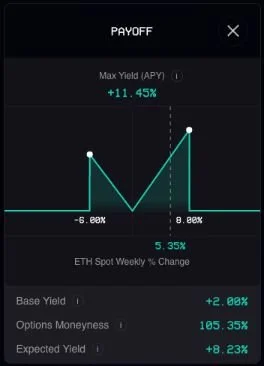
Ribbon Earn USDC is an all-weather product that generates yield by purchasing [Backed IB01 $ Treasury Bond 0–1yr](https://uploads-ssl.webflow.com/622f4d1701727dc75198439a/640f24743a879f53d86468fe_bIB01%20Factsheet.pdf) tokens with an average YTM of 4.64% (as of April 10), then enhancing that by purchasing weekly at-the-money [knock-out barrier options](https://bookdown.org/maxime_debellefroid/MyBook/barrier-options.html#knock-out-options) on ETH, to get exposure to short-term volatility in the market in either direction. Depositors can get upside exposure to the crypto market and remain principal protected. Read more about the strategy [here](https://www.research.ribbon.finance/blog/introducing-ribbon-earn).
#### **V2 Upgrade**
We are making two key changes in the V2 upgrade:
1. **Risk-Free Rate**: Instead of sourcing funding by lending USDC open-term to market makers like Wintermute and Folkvang in V1, V2 sources funding by purchasing Backed IB01 tokens which represent ownership of the tracker certificate for the underlying [iShares $ Treasury Bond 0–1yr UCITS ETF](https://www.blackrock.com/americas-offshore/en/products/307243/ishares-treasury-bond-0-1yr-ucits-etf).
2. **ETH 10-delta Knock-Out Barrier:** Instead of maintaining fixed % knock-out barriers for the exotic option in V1, in V2 the barriers will be fixed at the 10-delta levels and thus move dynamically with volatility.
# Risk-Free Rate
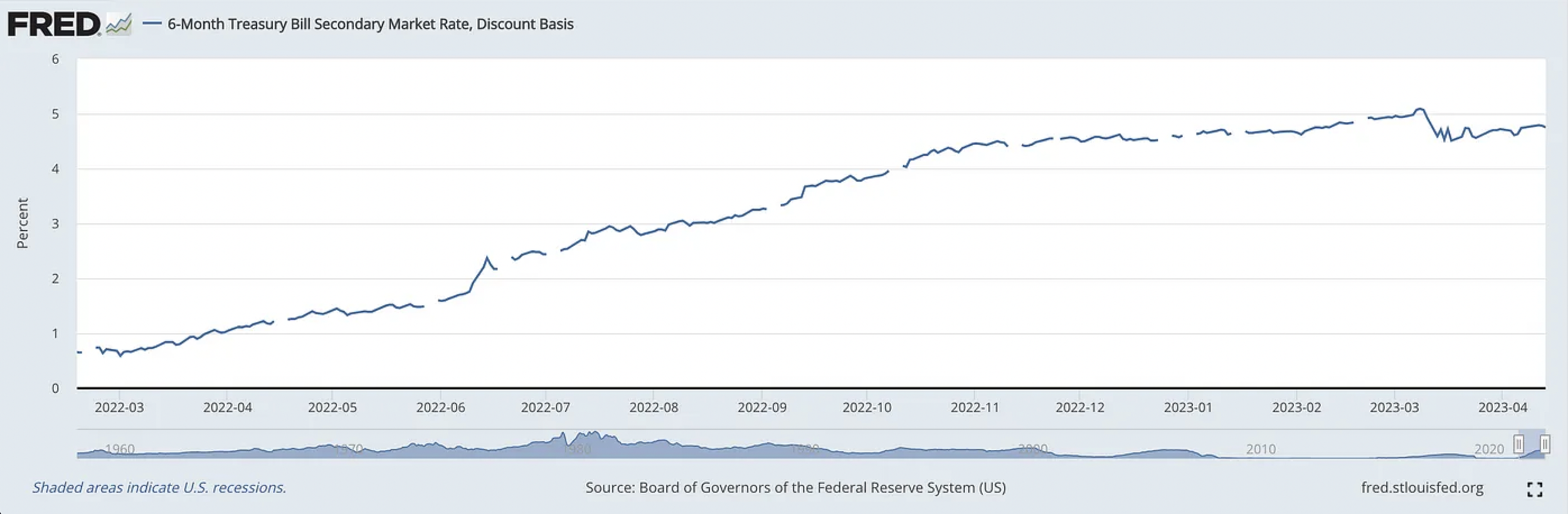
T-Bills, or short-term U.S. treasuries, are considered the risk-free rate and are secured by the full faith and credit of the United States government. Today, a 6 month T-Bill yields [4.93%](https://www.bloomberg.com/markets/rates-bonds/government-bonds/us). This led to the proliferation of companies like [Backed Finance](https://backed.fi/) (and others) who have tokenized U.S. treasuries on-chain.
The purchased Backed bIB01 tokens are **100%** backed by the Blackrock-managed ETF, which is a portfolio composed of US Dollar denominated government bonds issued by the US Treasury, with remaining maturities between zero and one year.
**Bankruptcy-remote**
The issuer (Backed Assets GmbH) is a bankruptcy-remote, special purpose vehicle (“SPV”) with the sole business purpose of the issuance of financial instruments, such as the IB01 tracker certificate. Assets are ringfenced from the parent company’s (Backed Finance) balance sheet which limits financial risk and further protects the entity’s obligations towards the token holders.
**Off-Chain Transparency**
Backed Finance is integrating with Chainlink’s [Proof of Reserves](https://chain.link/proof-of-reserve?agid=mejd7u83t5vg\&cnid=7j46b0d9320o\&gclid=CjwKCAjwitShBhA6EiwAq3RqA6-gcFxCVlg7S3IhNNAiWikTaSFDUzeS4jYKjJwQZc0uQK5n1wYzSRoCX84QAvD_BwE\&utm_medium=paid-search\&utm_source=google) to enable seamless, decentralized, and autonomous proof of reserves attestations by verifying collateral amounts and posting that data on-chain. This ensures that the bIB01 tokens are indeed backed 1:1 by securities in the custodian bank.
# Twin win strategy
The vault earns a base APY and uses the remaining funding to purchase weekly [at-the-money](https://www.investopedia.com/terms/a/atthemoney.asp#:~:text=At%20the%20money%20\(ATM\)%20are,implied%20volatility%20or%20interest%20rates.) [knock-out barrier options](https://www.investopedia.com/terms/k/knock-outoption.asp#:~:text=Knock%2Dout%20options%20are%20a,losses%2C%20but%20also%20potential%20profits.).
Adjusting to a 10-delta barrier strike for both the lower and upper barriers makes the barriers move with volatility. This means that:
1. If the market anticipates low volatility, we don’t have to pay extra for wider barriers that will not be useful (as the probability of hitting them is very low so price goes up)
2. Barriers level will move with how spot has been moving historically
3. Keeps participation rate more stable from week to week as option price doesn’t vary as much
# Vault specifications
* Option Tenor: 7 DAYS
* Upside Barrier: variable (10 delta)
* Downside Barrier: variable (10 delta)
* Strike Price: 100%
* Capital Protection: 100%
* Base APY: 2.00%
* Max APY: 9.91%
* Barrier Type: EUROPEAN (OBSERVED AT MATURITY)
* bIB01 Allocation: 100%
# Eligibility
Individuals or entities from these countries are **prohibited** from using **Ribbon Earn USDC**: Belarus, Cuba, Democratic People’s Republic of Korea (DPRK), Democratic Republic of Congo, Iran, Iraq, Lebanon, Libya, Mali, Myanmar, Nicaragua, Russia, Somalia, South Sudan, Sudan, Syria, Ukraine, United States of America
# Fees
The vault fee structure consists of a 15% flat fee on the yield earned between epochs.
# Ribbon Earn stETH
Ribbon Earn stETH uses the 0.5% of deposited funds as well as the yield generated from staking ETH onLido to fund exotic options and enhance the yield earned on stETH. So the vault employs a fully funded [dolphin strategy](/ribbon-earn/ribbon-earn-steth/what-is-a-dolphin-strategy) through which depositors can capitalise on the upside ETH movements while also ensuring their capital is protected up to 99.5% per trade.
The name "dolphin" (or "sharkfin") comes from the shape of the vault yield curve, that of a "[dolphin's fin](/ribbon-earn/ribbon-earn-steth/what-is-a-dolphin-strategy)".
# What is a dolphin strategy?
The vault earns a base APY from Lido and uses the remaining funding, plus the 0.5% of its deposits, to purchase weekly at-the-money knock-out barrier options.
The weekly [barrier options](https://www.investopedia.com/terms/b/barrieroption.asp) enable the vault to participate in any ETH upside from 90% up to 110% of the ETH's spot level at the start of the week (upside barrier). However, if the price of ETH has increased by more than 10% at the end of the week, the barrier options expire worthless and the vault earns the base APY only.
# Vault specifications
* Option Tenor 7 DAYS
* Upside Barrier 110%
* Strike 90%
* Capital Protection 99.5%
* Base APY 0.75%
* Max APY 14.92%
* Barrier Type EUROPEAN (OBSERVED AT MATURITY)
* Options Allocation 0.577%
# Risk profile
The main risks associated with the vault are market risk, stETH/ETH price risk and the slashing risk:
* Market risk: as each trade is 99.5% protected, if the option payout is 0, depositors can lose a fraction of their capital invested every week.
* stETH/ETH price risk: as the payoff is based on the ETH price but is paid in stETH, the actual quantity of stETH earned is dependent on the exchange rate between ETH and stETH.
* Slashing risk: ETH validators risk staking penalties, with up to 100% of staked funds at risk if validators fail. To minimise this risk, Lido stakes across multiple professional and reputable node operators with heterogeneous setups, with additional mitigation in the form of insurance that is paid from Lido fees.
# Fees
The vault fee structure consists of a 10% flat fee on the yield earned between epochs, conditional on the strategy returning at least the principal for this epoch.
# Introduction to Ribbon Lend
## What is Ribbon Lend?
#### \*\*\*Ribbon Lend is currently paused until further notice\*\*\*
Ribbon Lend is a DeFi marketplace for institutional [unsecured loans](https://www.investopedia.com/terms/u/unsecuredloan.asp). Users can deposit their capital in single-borrower, insured pools, created and launched on Ribbon Lend by institutional borrowers (like Folkvang and Wintermute, just to name a few) who have been whitelisted. Lenders can receive favorable risk-adjusted interest rates in exchange for providing liquidity, while whitelisted institutional borrowers can borrow money from a decentralized source without the need for collateral.
Ribbon Lend offers the best of both worlds between TradFi and DeFi:
1. [Yields from unsecured lending](/ribbon-lend/introduction-to-ribbon-lend/yields-from-unsecured-lending); you can decide independently how much and in which pools to deposit, based on your preferred risk/return profile.
2. [No lockups](/ribbon-lend/introduction-to-ribbon-lend/no-lockups) from Aave’s money market model; you can withdraw whenever you want, the overall amount of funds that can be withdrawn is determined solely by the utilization rate of the pool.
3. [Off-chain enforcement / credit underwriting](/ribbon-lend/introduction-to-ribbon-lend/off-chain-enforcement-credit-underwriting);
4. [Built-in insurance](/ribbon-lend/introduction-to-ribbon-lend/built-in-insurance).
All loans in our structured products, including Ribbon Earn and new vaults, will flow into Ribbon Lend pools. This allows us to leverage our Ribbon structured products as a reliable and sizable source of lending deposits in the credit facility.
Furthermore, this allows our structured products to be redeemable on a weekly basis and potentially even on a block-by-block basis, attracting further TVL.
### Zapping feature (*coming soon*)
Deposits in Ribbon Lend can be made in USDC but soon we are going to release a new zapping feature, which will let users deposit USDT, DAI, FRAX, etc. into Lend. Under the hood we'll swap your stable of choice to USDC on Curve.
# Yields from unsecured lending
The demand for leverage is at all-time-lows in DeFi. Lending USDC on Aave’s money market yields \~1% APY; lending USDC on Ribbon Lend to institutional market makers currently yields 7%-10% APY organically, plus additional RBN liquidity mining incentives. These are pre-3AC rates — major CeFi lending desks have already come back online to lend to the same market makers.
Ribbon Lend pools are permissionless, so anyone can participate. You can deposit into any available pool, based on your preferences and expectations. Therefore, you can individually choose to whom you lend your capital. Following each deposit, you will receive receipt tokens (rToken); they represent your position in a given pool and accrue that pool's interest rate on each block.
Pools interest rates are dynamic: they change according to the [utilization rate](/ribbon-lend/introduction-to-ribbon-lend/no-lockups/pool-status), or percentage of the pool's liquidity that is being used by the borrower at any particular moment, following a [specific curve](/ribbon-lend/introduction-to-ribbon-lend/no-lockups/pool-status#utilization-curve). Interest is accumulated for each block and it immediately raises the borrower's utilization rate. In other words, interest is immediately paid to the lenders, but from the liquidity of the pool itself. The borrower may choose the frequency and amount of each repayment, provided that the utilization rate does not exceed a specified level established by governance.
# No lockups
Most unsecured loans in DeFi are still fixed term — this means that lenders must wait until the loan maturity to exit their position. This leaves a significant void for on-chain USDC holders who are willing to lend unsecured but are unwilling to lock their capital. As DeFi users ourselves, we recognize the immense opportunity cost with being locked in a position.
Ribbon Lend operates like Aave — a peer-to-pool mechanism that sets rates based on [utilization of funds in the pool](/ribbon-lend/introduction-to-ribbon-lend/no-lockups/pool-status). As long as there is liquidity in the pool, users can exit their loans instantly, and accrue interest only for as long as they have been in the pool. Ribbon Lend’s pools use a utilization curve that incentivizes borrowers to leave some liquidity in the pool to facilitate withdrawals.
Withdrawing is equivalent to making a token redemption for your rTokens: you return them in exchange for your capital.
# Pool status
Each pool is characterized by a utilization status, based on the utilization rate:
Utilization rate
Pool Status
Time Limit
<95%
Active
ꝏ
>95%
Warning
Until utilization = 99% or <95%
99%
Provisional Default
120 Hours
Each status corresponds to possible actions by lenders and borrowers:
* ACTIVE: Lenders: can deposit and withdraw; Borrower: can draw liquidity and repay.
* WARNING: Lenders: can deposit and withdraw; Borrower: can only repay. Interest will continue to accrue.
* PROVISIONAL DEFAULT: Lenders: deposit and withdrawals are blocked; Borrower: has 120 hours to deposit and get the utilization rate under 95%
If past 120 hours the borrower has not brought the utilization rate below 95 percent, the pool will go into [Default](/ribbon-lend/introduction-to-ribbon-lend/no-lockups/default).
### Utilization curve
The relationship between interest rates and pool utilization rates follow curves set by the Team, based on prevailing CeFi lending rates to market makers.
* The curve has its lowest interest rate (Ym) at utilization (Xm) in order to achieve optimal utilization and capital efficiency;
* The curve discourages utilization in lower and extreme high ranges;
* The borrow APR steadily decreases with utilization from X0 to Xm. This compensates lenders who maintain funds within the pool with a more favorable interest rate when the borrower utilization rate is below optimal;
* Concurrently the curve increases sharply from Xm to X1, discouraging high utilization. This design reinforces the exit liquidity available for lenders even when utilization is optimal;
* During periods of volatility where liquidity withdrawal rates are higher, utilization/interest rates will peak, incentivising borrowers to reduce utilization in order to avoid higher interest rates. Higher interest rates may also attract new lenders to the pool.
# Default
Default is an exceptional status, resulting in the immediate auction of the pool's debt positions (rTokens). Bidders may be either persons or organizations, but they must be whitelisted; this is accomplished by disclosing the Ultimate Beneficial Owner of the bid and by offering KYC information. Please reach out using our [communication channels](broken://pages/8PQKnbaYZb0faTaZ2CUn) if you wish to be whitelisted.
The borrower in the pool is not allowed to take part in the auction. The minimum bid at the auction must be more than the insurance amount (see below). The auction will run for 336 hours.
At the end of the auction, there will be a vote procedure where all holders of rTokens will have the chance to approve or disapprove the winning bid:
* If the majority decides to reject the bid: holders will be able to redeem the tokens for their share of the pool [insurance](/ribbon-lend/introduction-to-ribbon-lend/built-in-insurance); they'll also keep the rights to legally pursue the defaulted borrower individually.
* If the majority decides to accept the bid: holders will be able to redeem the tokens for their share of the winning bid; they will cede the legal authority to pursue the defaulted borrower to the successful bidder.
Upon acceptance of the bid, the successful bidder will be given an NFT containing the legal rights to the debt, as well as the sole legal authority to pursue the defaulted borrower.
# Off-chain enforcement / credit underwriting
Offering unsecured lending on-chain requires a developed off-chain process for credit underwriting (including KYC/AML) and legal recourse. As we have already done with [Ribbon Earn](/ribbon-earn/introduction-to-ribbon-earn), we are collaborating with [Credora](https://credora.io/).
Credora aggregates information from custody venues, CEX spot / derivatives positions, on-chain positions across >5 chains, bank accounts, and other sources to get a comprehensive picture of a market maker’s credit worthiness. Most of this can be monitored in real-time, so a borrower’s credit worthiness can change on a minute by minute basis. This real-time info comprises \~50% of a borrower’s credit rating weight. The other \~50% are more traditional methods such as looking into borrow history and lending relationships, custody processes, ROE, ROA, max drawdowns, solvency ratio, etc. See[ Credora docs](https://credora.gitbook.io/credit-methodology/SbLmTxogePkrzsF4z9IK/credit-evaluation/credit-score) for more information on credit methodology. Credora has 16 DeFi integrations, 25 CeFi integrations, and +100 borrower/lender institutions onboarded so far. Credora has helped facilitate $785M in loans and monitors $3.85B to date.
It is important to note that although Credora's ratings are representative and timely, they should in no way be interpreted as an invitation to invest in a particular pool or as a "guarantee" of successful investment. They are to be considered solely as indications of the borrowers' creditworthiness.
# Built-in insurance
Each pool has its own insurance fund; it is established by setting aside a percentage of 5% of accrued interest charged to the borrower.
Following a default and the auction mechanism described above, two alternative scenarios may arise:
1. As mentioned, if the lenders reject the best offer received in the auction, they can ask for the partition of the insurance fund;
2. On the contrary, if they accept the bid, the insurance fund is automatically acquired by the person/organization who won the auction.
The insurance sum is converted to protocol revenues when a pool is closed.
# Fees
Fees are a portion of pool interest that is gained on each block. We charge the 5% of supply side interest for protocol revenue sent to the DAO.
For example, if borrow APY is 9%, 5% of that APY (0.45%) is protocol revenue.
# Introduction to Ribbon Treasury
## **What is Ribbon Treasury?**
Ribbon Treasury are private Ribbon [Theta vaults](/theta-vault/theta-vault) built specifically for DAOs to run covered calls on their native tokens. These private vaults are segregated from the main Ribbon vaults, and run a custom strategy for each DAO. Each vault has a few unique parameters:
* **Strike Selection Methodology**\
DAOs can choose how aggressive they want to be with regards to the strike selection methodology.
* **Tenor**\
DAOs can choose how often they want to run the strategy. The current Ribbon Vaults run a weekly strategy that automatically re-rolls, but DAOs can choose longer tenors.
* **Premium Currency**\
DAOs can also choose what currency they want to receive the premiums in. For example, a DAO could elect to receive premiums in USDC or ETH, depending on their treasury diversification goals.
##
##
# Why Ribbon Treasury?
As noted in Hasu’s [“A New Mental Model for Defi Treasuries”](https://uncommoncore.co/a-new-mental-model-for-defi-treasuries/), many DAO treasuries consist primarily of their own native token, which should not/cannot be considered as a real treasury. Ribbon Treasury allows DAOs to generate income on their native tokens and build a healthy diversified portfolio of assets.
We think this makes it a perfect product for DAO treasuries for multiple reasons:
1. DAOs who are sitting on hundreds of millions of dollars of their own native token often have **no way to generate yield on them**. Covered calls unlocks significantly higher income generation on those assets;
2. Instead of selling tokens on the open market to **diversify the treasury**, DAOs could sell covered calls on their native asset and collect the premiums in stables;
3. DAOs are **well suited to sell upside volatility in their own native token** in exchange for cash today. In the case that the token is flat or down, the DAO would have collected premiums for free. In the case that the token goes up significantly, the DAO would have given up some of that upside — which is totally reasonable risk-reward for a DAO that already owns significant amounts of the native token.
##
# Partners
#### [Perpetual Protocol](https://mobile.twitter.com/perpprotocol/status/1492105547490988051) (launch partner, take a look here for a [case study](https://www.research.ribbon.finance/blog/perp-vault-case-study-on-treasury-management))
#### [Balancer Labs](https://twitter.com/ribbonfinance/status/1547077500215341056)
#### [Abracadabra](https://mobile.twitter.com/MIM_Spell/status/1557774128891011073)
#### [Badger DAO](https://twitter.com/ribbonfinance/status/1562363921087967233)
# How to get involved
If your DAO is interested, please fill this [very short form](https://forms.gle/SkfCJaBbXi5R4zs96) use our [comms channels](/#communication-channels) to get in touch.\
There are no special requirements to start the conversation; however, these two conditions should be met:
* There should be perps for the token on a CEX, so that market makers can hedge easily;
* DAO should be willing to deploy between $1-$5 million of their native token into Ribbon Treasury.
# Overview and RBN tokenomics
Ribbon DAO consists of multiple smart contracts. Governor Bravo's standard one token, one vote method is expanded to include a weighting system based on locking RBN for veRBN tokens.
Ribbon DAO has two tokens:
1. [RBN](https://www.coingecko.com/en/coins/ribbon-finance)
* governance voting
2. [veRBN](https://etherscan.io/address/0x19854C9A5fFa8116f48f984bDF946fB9CEa9B5f7) (vote-escrowed RBN)
* governance voting
* gauge voting
* boosts $RBN rewards earned on staked vault tokens
* gauge voting bribe yield in ETH, USDC, RBN
* boosting bribe yield in ETH, USDC, RBN
* share of protocol revenue
Source code for the Ribbon DAO can be found on [Github](https://github.com/ribbon-finance/governance/tree/main/contracts).
## Token distribution
**- 49% to Community Treasury**\
This community treasury is controlled by RBN Governance, and can be used to incentivize liquidity mining programs, provide provide grants to developers, and other programs to improve the protocol. 20% of this supply is unlocked immediately, and the remaining is vested linearly over 3 years starting from 24th May 2021.
**- 23% to Current and Future Team**\
These tokens go to the current team members as well as future team. This entire allocation is on a 3-year vesting schedule, with a 1-year cliff, starting from 24th May 2021.
**- 15% to Current Investors**\
These tokens go to the existing Ribbon investors over two private funding rounds to fund the development of the project thus far. This entire allocation is on a 3-year vesting schedule, with a 1-year cliff, starting from 24th May 2021.
**- 8% to Corporate Property**\
These tokens goes to the company behind the development of the Ribbon protocol. These tokens are reserved for advisors, future fundraises, and future employees, who will all have a similar vesting schedule based on when the agreements are executed.
**- 3% to Retroactive Airdrop Recipients**\
These tokens go to the [RBN Retroactive Airdrop 71](https://ribbonfinance.medium.com/rbn-airdrop-distribution-70b6cb0b870c) which took place on the 25th of May 2021. This allocation is not locked.
**- 1% to Liquidity Mining Participants**\
These tokens go to the first Liquidity Mining program, which was part of [RGP-2 19](https://ribbonfinance.medium.com/rgp-2-liquidity-mining-program-cc81f0b7a270) that took place on 16th June 2021. This allocation is not locked.
**- 1% to Initial Market Makers**\
These tokens go to the initial market making firms that provided services from the first week of the Theta Vaults operations onward. This entire allocation is on a 1-year vesting schedule, starting from 24th May 2021.
# Vote-Escrowed RBN
Participating in Ribbon DAO governance requires that an account have a balance of vote-escrowed RBN (veRBN) or regular RBN. veRBN is a non-standard ERC20 implementation, used within Governor Bravo voting system to determine each account’s voting power.
veRBN is represented by the `VotingEscrow` contract, deployed to the Ethereum mainnet at:
> [0x19854C9A5fFa8116f48f984bDF946fB9CEa9B5f7](https://etherscan.io/address/0x19854C9A5fFa8116f48f984bDF946fB9CEa9B5f7)
veRBN cannot be transferred. The only way to obtain veRBN is by locking RBN. The maximum lock time is two years. One RBN locked for two years provides an initial balance of one veRBN.
A user’s veRBN balance decays linearly as the remaining time until the RBN unlock decreases. For example, a balance of 4000 RBN locked for 6 months provides the same amount of veRBN as 2000 RBN locked for one year, or 1000 RBN locked for two years.
### Unlock
There are two options for unlocking locked veRBN:
1. waiting until your vote lock expires and unlocking penalty-free
2. unlock RBN whenever you want at the cost of paying a penalty. The penalty is calculated by taking the minimum between .75 and (time left until unlock) / 2 years. For example if you have 1 year left on your lock, the penalty is min(.75, 1/2) = 0.5. So the penalty is 50%. **All penalties will be redistributed to the remaining lockers pro-rata.**
### Implementation Details
User voting power $$𝑤𝑖$$ is linearly decreasing since the moment of lock. So does the total voting power 𝑊. In order to avoid periodic check-ins, every time the user deposits, or withdraws, or changes the locktime, we record user’s slope and bias for the linear function $$𝑤𝑖(𝑡)$$ in the public mapping `user_point_history`. We also change slope and bias for the total voting power $$𝑊(𝑡)$$ and record it in `point_history`. In addition, when a user’s lock is scheduled to end, we schedule change of slopes of $$𝑊(𝑡)$$ in the future in `slope_changes`. Every change involves increasing the `epoch` by 1.
This way we don’t have to iterate over all users to figure out, how much should $$𝑊(𝑡)$$ change by, neither we require users to check in periodically. However, we limit the end of user locks to times rounded off by whole weeks.
Slopes and biases change both when a user deposits and locks governance tokens, and when the locktime expires. All the possible expiration times are rounded to whole weeks to make number of reads from blockchain proportional to number of missed weeks at most, not number of users (which is potentially large).
For more details, please visit [curve docs](https://curve.readthedocs.io/dao-vecrv.html#querying-balances-locks-and-supply).
# Fee Collection and Distribution
Ribbon Finance takes 10% performance fees and 2% management fees. 50% of the protocol revenue gets sent to the treasury. The other 50% of protocol revenue gets converted to ETH and distributed to veRBN holders for reliable-cash flow. This is exactly what Curve does except instead of redirecting profits from option premiums it redirects profits from [LP fees](https://curve.readthedocs.io/dao-fees.html#fee-distribution).
The protocol revenue has been directed to RBN lockers pro-rata **retroactively,** starting from veRBN launch on February 28th, 2022.
Protocol fee sharing was launched in **April 2022.**
# Liquidity Gauges and RBN Emissions
Ribbon incentivizes vault depositors with RBN, the protocol governance token. Allocation, distribution and emission of RBN are managed via several related DAO contracts:
* `LiquidityGauge`: Measures vault tokens (i.e. rETH-THETA) provided by users over time, in order to distribute RBN and other rewards
* `GaugeController`: Central controller that maintains a list of gauges, weights and type weights, and coordinates the rate of RBN production for each gauge
* `Minter`: RBN emission contract, sends non-circulating RBN into circulation via liquidity gauges
### Implementation Details
#### RBN Emissions
RBN follows a constant inflation schedule of 250,000 RBN per week rewarded to vault depositors over the course of 6 months. This is \~6.5 M RBN overall, or 0.65% of total supply. This is subject to changes before the 6 months have elapsed. We will officially revisit this inflation schedule after the 6 months.

#### Liquidity Gauges
Emissions are directed to users who deposit into the protocol option selling vaults. This usage is measured via “Liquidity Gauge” contracts. Each pool has an individual liquidity gauge. The [Gauge Controller ](#the-gauge-controller)maintains a list of gauges and their types, with the weights of each gauge and type.
To measure liquidity over time, the user deposits their vault tokens into the liquidity gauge. Coin rates which the gauge is getting depends on current emission rate, gauge weight, and gauge type weights. Each user receives a share of newly emitted RBN proportional to the amount of vault tokens locked. Additionally, rewards may be boosted by up to factor of 2.5 if the user vote-locks tokens for Ribbon governance in the [Voting Escrow](/ribbonomics/overview-and-rbn-tokenomics/vote-escrowed-rbn) contract.
Suppose we have the constant emission rate $$𝑟$$, gauge weight $$𝑤g$$ and gauge type weight $$𝑤𝑡$$. Then, all the gauge handles the stream of inflation with the rate $$𝑟′=𝑤𝑔*𝑤𝑡*𝑟$$ which it can update every time $$𝑤𝑔,𝑤𝑡$$, or mining epoch changes.
To calculate a user’s share of $$𝑟′$$, we must calculate the integral: $$ $𝐼𝑢=∫(𝑟′(𝑡)𝑏𝑢(𝑡)/𝑆(𝑡))𝑑𝑡 $$ where $$𝑏𝑢(𝑡)$$ is the balance supplied by the user (measured in vault tokens) and $$𝑆(𝑡)$$ is total deposits supplied by users, depending on the time $$𝑡$$; the value $$𝐼𝑢$$ gives the amount of tokens which the user has to have emitted to them. The user’s balance $$𝑏𝑢$$ changes every time the user $$ $𝑢 $$ makes a deposit or withdrawal, and $$𝑆$$ changes every time \_any\_ user makes a deposit or withdrawal (so $$ $𝑆 $$ can change many times in between two events for the user $$𝑢"$$. In the liquidity gauge contract, the value of $$𝐼𝑢$$ is recorded per-user in the public `integrate_fraction` mapping.
To avoid requiring that all users to checkpoint periodically, we keep recording values of the following integral (integrated over 0 -> t) (named `integrate_inv_supply` in the contract):
> $$ $𝐼𝑖𝑠(𝑡)=∫(𝑟′(𝑡)/𝑆(𝑡))𝑑t $$
The value of $$𝐼𝑖𝑠$$ is recorded at any point any user deposits or withdraws, as well as every time the rate $$𝑟′$$ changes (either due to weight change or change of mining epoch).
#### Boosting
In order to incentivize users to participate in governance, and additionally create stickiness for liquidity, we implement the following mechanism. A user’s balance, counted in the liquidity gauge, gets boosted by users locking RBN tokens in [Voting Escrow](/ribbonomics/overview-and-rbn-tokenomics/vote-escrowed-rbn) contract, depending on their vote weight $$𝑤𝑖wi$$: $$𝑏𝑢\*=min(0.4𝑏𝑢+0.6𝑆\*𝑤𝑖/𝑊,𝑏𝑢)$$ The value of $$𝑤𝑖$$ is taken at the time the user performs any action (deposit, withdrawal, withdrawal of emitted RBN tokens) and is applied until the next action this user performs.
If no users vote-lock any RBN (or simply don’t have any), the inflation will simply be distributed proportionally to the liquidity $$𝑏𝑢$$ each one of them provided. However, if a user stakes enough RBN, they are able to boost their stream of RBN by up to factor of 2.5 (reducing it slightly for all users who are not doing that).
Implementation details are such that a user gets the boost at the time of the last action or checkpoint. Since the voting power decreases with time, it is favorable for users to apply a boost and do no further actions until they vote-lock more tokens. However, once the vote-lock expires, everyone can “kick” the user by creating a checkpoint for that user and, essentially, resetting the user to no boost if they have no voting power at that point already.
RBN lockers can delegate their boost to other addresses and in return earn yield through [bribes](/ribbonomics/overview-and-rbn-tokenomics/bribes).
#### Gauge Weight Voting
Users can allocate their veRBN towards one or more liquidity gauges. Gauges receive a fraction of newly minted RBN tokens proportional to how much veRBN the gauge is allocated. Each user with a veRBN balance can change their preference at any time.
When a user applies a new weight vote, it gets applied at the start of the next epoch week. The weight vote for any one gauge cannot be changed more often than once in 10 days.
RBN lockers can vote for particular gauges and in return earn yield through [bribes](/ribbonomics/overview-and-rbn-tokenomics/bribes).
#### The Gauge Controller
The “Gauge Controller” maintains a list of gauges and their types, with the weights of each gauge and type. In order to implement weight voting, `GaugeController` has to include parameters handling linear character of voting power each user has.
`GaugeController` records points (bias + slope) per gauge in `vote_points`, and \_scheduled\_ changes in biases and slopes for those points in `vote_bias_changes` and `vote_slope_changes`. New changes are applied at the start of each epoch week.
Per-user, per-gauge slopes are stored in `vote_user_slopes`, along with the power the user has used and the time their vote-lock ends.
The totals for slopes and biases for vote weight per gauge, and sums of those per type, are scheduled / recorded for the next week, as well as the points when voting power gets to 0 at lock expiration for some of users.
When a user changes their gauge weight vote, the change is scheduled for the next epoch week, not immediately. This reduces the number of reads from storage which must to be performed by each user: it is proportional to the number of weeks since the last change rather than the number of interactions from other users.
### Gauge Types
Each liquidity gauge is assigned a type within the gauge controller. Grouping gauges by type allows the DAO to adjust the emissions according to type, making it possible to e.g. end all emissions for a single type.
Currently active gauge types are as follows:
> * Vault (all Ethereum vaults): `0`
### LiquidityGauge
Each pool has a unique liquidity gauge. Deployment addresses can be found in the [addresses reference](/developers/contract-addresses) section of the documentation.
There are several versions of liquidity gauge contracts in use. Source code for these contracts is available on [Github](https://github.com/ribbon-finance/governance/tree/main/contracts/tvl-staking).
For more details, please visit [curve docs](https://curve.readthedocs.io/dao-gauges.html#querying-gauge-information).
# Gauge Weight Voting
## **Voting Rules and Information:**
* Voting will be done via [Snapshot](https://snapshot.org/#/gauge.rbn.eth).
* **veRBN** holders may spread their votes among multiple pools in gauge weight votes.
* **veRBN** holders may receive [bribes](/ribbonomics/overview-and-rbn-tokenomics/bribes).
* Gauge weight votes will be **bi-weekly,** starting Fridays at 00:00 UTC and ending on Wednesday 00:00 UTC. The Multisig will then have 2 days to manually update gauge weights accordingly. Please see figure below for the lifecycle of gauge weight vote proposals.
* Other Ribbon governance votes will be addressed as they arise.
{% hint style="warning" %}
Ribbon Finance multi-sig is still required to sign to establish outcomes of all Ribbon Snapshot votes, for both governance and Ribbon gauge weight votes. In almost all cases, we will vote in-line with RBN / veRBN holders. However, proposals considered to be blatant attacks damaging the protocol will not be signed for.
{% endhint %}

# Bribes
**Bribes via Directed Gauge Voting**
As a veRBN holder, similar to [veCRV](https://curve.readthedocs.io/dao-gauges.html?highlight=multiplier#gauge-weight-voting) holders, you will be able to vote on RBN distributions to the respective options vault gauges. This is extremely powerful since you can vote to direct more RBN rewards to the vault you are staked in! Alternatively, similar to boosting you can accept bribes to redirect RBN emissions to a particular option vault gauge.
**Bribes via Boosting Delegation**
RBN stakers will have the flexibility to delegate their boosts to other users if they so choose. They can either do this for altruistic purposes, or more likely, for bribes. Imagine that you don’t want any exposure to the options vaults so you are not staking vault deposit tokens. But you have staked your RBN. You will be able to delegate your boost to others who are staking vault deposit tokens and receive some yield from them for doing so. This allows you to reap all the benefits of staking RBN without having to actually deposit into the vaults.
Please see this [step-by-step guide](/ribbonomics/overview-and-rbn-tokenomics/bribes/guide-to-boost-bribing) for boost bribes.
The bribing marketplace is available at hiddenhand.finance/ribbon, powered by [Redacted Cartel](https://www.redactedcartel.xyz/).
# Guide to Boost Bribing
Step by step guide to using the Hidden Hand x Ribbon Boost Marketplace
1. [Bribers](/ribbonomics/overview-and-rbn-tokenomics/bribes/guide-to-boost-bribing/for-bribers)
2. [veRBN holders](/ribbonomics/overview-and-rbn-tokenomics/bribes/guide-to-boost-bribing/for-verbn-holders)
# For Bribers
1. Create a Boost proposal for a specific address at - click the “Create Boost Bribe” button
2\. Enter receiver address, and the duration of the Boost Bribe Proposal, submit the form

3\. Wait for new proposal to appear in the list of proposals (\~30 seconds - 1 minute)
4\. Click the “Add Bribe” button on the new Boost Bribe Proposal card

5\. Select the reward token, amount, and submit the form to create a bribe

# For veRBN Holders
1. Find proposals with rewards at
2. Delegate your veRBN to the receiver by clicking “Delegate Boost”

3\. Complete the form by specifying the percentage of your veRBN holdings to delegate, and the duration of the delegation - the longer the duration, the greater the share of rewards.

4\. At the end of the Boost, you can claim any eligible rewards via
# Upgrades
We have the option to make the following changes to the current architecture:
1\. adjusting RBN emission rate
2\. unlocking all locked RBN ahead of the max 2 year lock
Given the speed of change in DeFi, being able to change our minds about something as fundamental as the tokenomics model is crucial to remain vigilant, especially in a space as competitive as DOV’s. We think we can maximize tokenholder value this way over having an immutable tokenomics architecture and predictable emission schedule for years to come.
# How to lock RBN, boost and claim protocol revenues
In this guide you will find instructions for the governance portal functions related to the mechanisms of Ribbonomics: RBN lock/unlock, protocol revenues, and boost. If while following these instructions you encounter any difficulties or errors, we are at your disposal in our [Discord](https://www.google.com/url?q=https://discord.gg/rm7h9ce3ep\&sa=D\&source=editors\&ust=1662914326367747\&usg=AOvVaw3oruiwoyDGZmkX1HbTWfO2) server Support channel.
Here’s the link to the governance portal: [https://vote.ribbon.finance](https://www.google.com/url?q=https://vote.ribbon.finance\&sa=D\&source=editors\&ust=1662914326368235\&usg=AOvVaw1kz6256urVgtQlA_3es8FN)
One important thing you need to keep in mind: locking, as you will read, gives you significant benefits but it’s quite different from staking. When you stake your vault shares, as illustrated in [this guide](/theta-vault/user-guides/how-to-stake-unstake-vault-shares-and-claim-rewards), you are free to come and go whenever you want but when you lock your RBN you must respect the lockup date, otherwise you’ll incur a severe exit penalty. In addition, unlike vault shares and staked vault shares, veRBN are not transferable.
You can get the most out of combining the two, staking + locking, because of the rewards boost. veRBN will also give you a percentage of protocol revenues, paid weekly in ETH.
## Connect your wallet
Please refer to the first section of [this guide](/theta-vault/user-guides/how-to-deposit#connect-your-wallet) if you need help connecting your wallet. The locking mechanism is only available on ETH mainnet.
## Lock your RBN
The first thing you’ll need to do is to authorize the portal to use your RBN. Select "LOCK RBN" at the bottom right (desktop) or "APPROVE" at the bottom (mobile). A tab will appear to confirm approval, and lastly you will need to authorize the transaction in your wallet. You’ll only need to do this once per wallet.

Once the onchain transaction is confirmed, you will receive a confirmation notification at the top.
At this point, you can lock your RBNs by selecting "LOCK RBN" again (desktop) or "LOCK" (mobile).

Two disclaimer cards will appear with very important information about how the lock works:
* You will turn your RBN into veRBN: veRBN allow you to multiply your staking rewards, [vote in biweekly gauges](https://www.google.com/url?q=https://snapshot.org/%23/gauge.rbn.eth\&sa=D\&source=editors\&ust=1662914326370824\&usg=AOvVaw13eRx6p2ZUa5Ua4kngmi3E) to determine which vaults receive the greatest rewards, participate in governance, and receive protocol revenues. However, these benefits are given to you in exchange for the lockup period, so if you unlock early you will have to pay a penalty. This penalty will result in a reduction of your RBN.
* The veRBN you will receive depend on the length of your lockup: the longer the lockup, the more veRBN you will receive, the more voting power you will have in the biweekly gauges, the more protocol revenues you will get. The relationship between lock duration and amount of veRBN is linear, up to a maximum of 1:1 for the duration of 2 years. For example, locking 1000 RBN for 2 years will give you 1000 veRBN; locking for 1 year will give you 500 veRBN; locking for 6 months will give you 250 veRBN, and so on. Your veRBN will also continue to decrease linearly until you reach the end of the lockup, following the same logic.

Going on, you will have to choose the amount and duration of the lock, from a minimum of 1 week to a maximum of 2 years. You will be able to select a default duration, or by selecting the calendar symbol on the right you will be able to choose any expiration date.
A very important note: you cannot lock on the same wallet for different durations. One wallet = one lockup period. If you want to lock different amounts of RBN for different durations, you will necessarily have to use multiple wallets. Remember, however, that your staking rewards boost will only apply to wallets that contain staked vault shares.
After a lock preview, as a final step you’ll need to confirm the transaction in your wallet.

Once again, you’ll get a notification at the top of the screen.
You are now a veRBN holder!
At any time you can take action on your RBN by increasing either their quantity or lockup duration. Select “LOCK RBN” (desktop) or “LOCK” (mobile) and a new card will appear; you will then have the option to take action on your lockup.

You will be able to add more RBN.

And/Or you’ll be able to increase the lock time.

Both of these actions will increase your veRBN, counteracting their linear decrease.
## Boost your staking rewards
Now that you have your veRBN it is time to apply the boost to your staking rewards, thus getting the most out of Ribbonomics.
Your boost applies to the entire wallet, so, if you have multiple vaults in staking, all positions will benefit, with varying multipliers based on the amounts of vault shares you hold.
If you are targeting a specific boost value (max 2.5x), you can use the rewards calculator: go to the staking page, following [this guide](/theta-vault/user-guides/how-to-stake-unstake-vault-shares-and-claim-rewards). Select the calculator right in the middle of the screen and you’ll be able to simulate your boosting power and the amount of veRBN you need to reach your desired outcome.

Once you are ready to boost, from the staking page go to the vault card you invested in: you’ll notice the appearance of a new button at the bottom right: "APPLY BOOST."
Before you continue, though, know that even claiming some rewards will get the boost application. So freely choose whichever mode you prefer between the two:
1. If you want to claim (and boost), follow the instructions in [this guide](https://docs.ribbon.finance/ribbonomics/pages/G2l32HQko3fLbUQ2uk05#h.z3a4mqkzsslw);
2. If you simply want to apply the boost without claim, select it and confirm the transaction.

You’ll get a notification at the top of the screen: your RBN rewards are now boosted.
Please notice that your boost will decrease over time, just as your veRBN will decrease linearly. If you increase your veRBN (see the previous section), remember to “APPLY BOOST'' (or CLAIM some rewards) to increase your boosting multiplier.
## Claim your revenues
Your veRBN entitle you to receive a percentage of all the protocol fees, paid weekly in ETH. You also receive a portion of the RBN that were taken as penalties from early unlockers.
The distribution day for protocol revenues is Friday. Remember, however, that the first week, the week in which you make the lock, you will not receive anything: you will be able to get your first revenues starting from the second week and their amount will also contain those of the first week, for the actual lock days only.
To start claiming, select the Ribbon logo at the top right corner.

Select the rewards you want to claim: ETH from the protocol fees or the RBN left by others as penalties (you are entitled to both but you’ll need two separate transactions).

Confirm the claiming transaction in your wallet.

Once again, you’ll get a notification at the top of the screen.
## Unlock your RBN
To unlock your veRBN simply select "UNLOCK RNB" (desktop) or "UNLOCK" (mobile) in the lower right corner. A card will appear with the unlock preview for confirmation; please notice the early unlock penalty (zero if the lockup has expired). Confirm the transaction in your wallet.

You’ll get a notification at the top of the screen and you’ll receive your RBN in your wallet.
# Deployed Contracts
These are the contract addresses that are deployed to Ethereum mainnet.
### Ribbon DAO